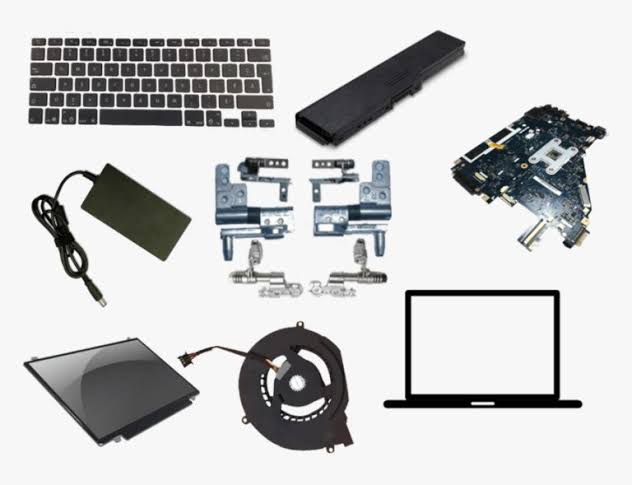
Knowing your laptop’s exact model number is one of the most important steps when buying replacement parts. Laptop batteries, chargers, keyboards and screens can look almost identical while being designed for completely different models.
If you need a replacement laptop part in South Africa, checking the model number before ordering can help you avoid buying an incompatible component.
The model number is usually printed somewhere on the laptop itself, although the exact location varies between brands and models. It may also be available in Windows or through the manufacturer’s software.
What Is a Laptop Model Number?
A laptop model number identifies the particular model or series of laptop you own.
For example, simply knowing that you have an “HP laptop” is usually not enough to identify the correct replacement battery or keyboard. HP produces many different laptop ranges, and individual models within those ranges can use different parts.
You might instead see a model such as:
- HP 250 G8
- Dell Latitude 5490
- Lenovo ThinkPad T480
- Acer Aspire A515-56
- Asus VivoBook X515
The more specific the model information you can find, the easier it becomes to identify compatible replacement parts.
Check the Bottom of the Laptop
The easiest place to start is usually the underside of the laptop.
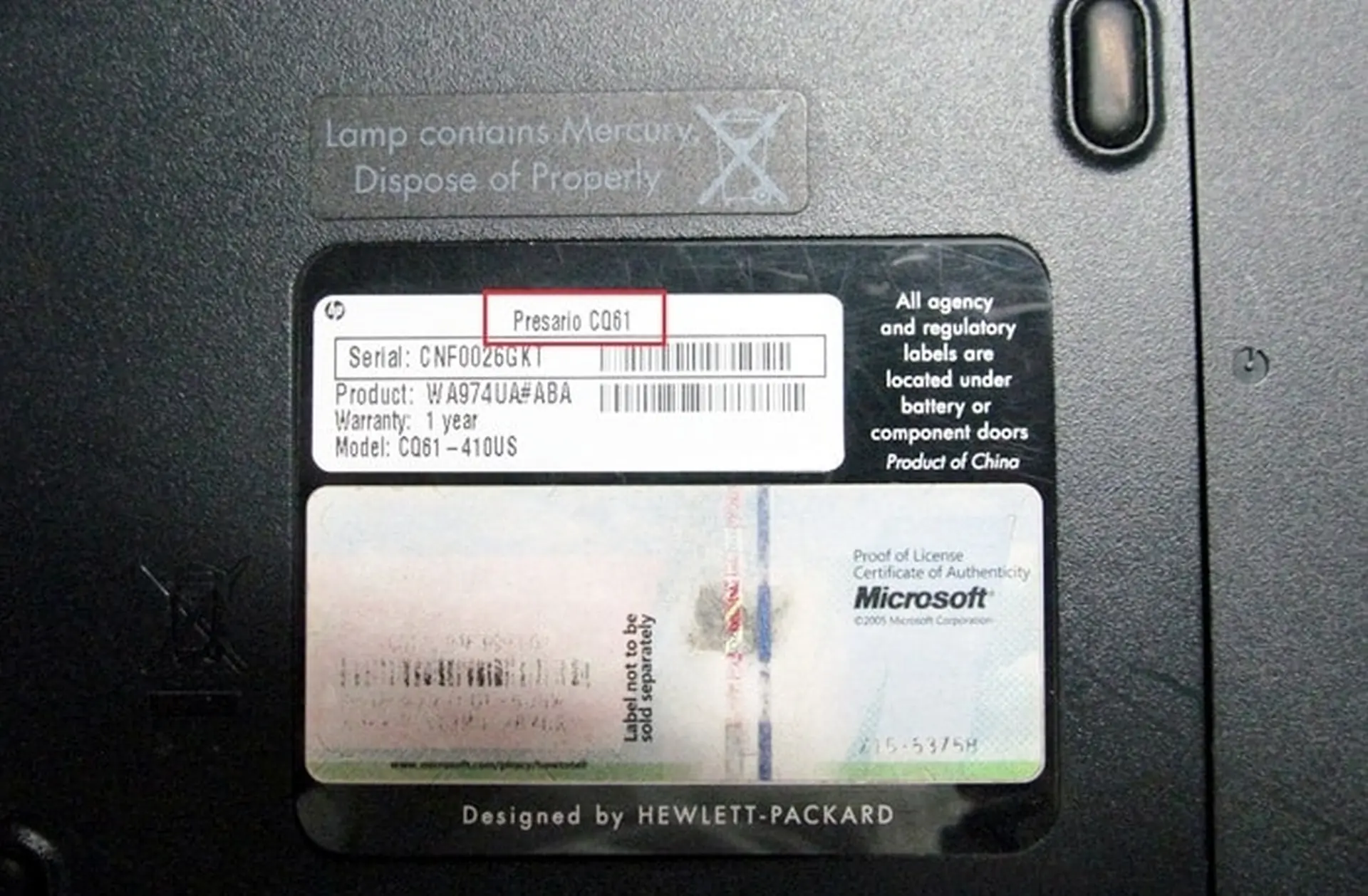
Turn the laptop over and look for a printed label, sticker or text engraved directly into the casing.
You may see information labelled:
- Model
- Model Number
- Product
- Product Name
- Product Number
- Type
- MTM
- Service Tag
- Serial Number
Be careful not to confuse the serial number with the model number. A serial number normally identifies your individual laptop, whereas the model number identifies the laptop design or product family.
On some newer laptops, the information may be printed in very small text, so using your phone camera to zoom in can make it easier to read.
Check Under a Removable Battery
Some older laptops have removable external batteries.
If your laptop has one, switch the laptop off, disconnect the charger and remove the battery. You may find a product label underneath it containing the laptop’s model information.
This was particularly common on older business and consumer laptops.
Do not remove an internally fitted battery simply to look for a model number unless you are comfortable opening the laptop. There are normally easier ways to identify the model.
Check Inside the Battery Compartment
On laptops with removable batteries, manufacturers sometimes place the main identification label inside the battery compartment.
The label may contain the laptop model, product number, serial number and other manufacturing information.
If there is no useful information visible on the bottom casing, this is worth checking.
Finding an HP Laptop Model Number
HP laptops often have model and product information printed on the underside of the laptop.
Look for terms such as:
Product Name
Product Number
Model
For example, the product name might identify the laptop as an HP ProBook, Pavilion, EliteBook or HP 250 series, while the product number gives more specific information about the configuration.
When looking for replacement HP laptop batteries, keyboards, screens or chargers, providing both the laptop model and product number can be helpful.
Some HP laptops also allow you to find product information through the HP software installed on the computer.
Finding a Dell Laptop Model Number
Dell laptops commonly display the model name on the bottom of the laptop or around the screen or keyboard area.
You may see names such as:
- Dell Inspiron
- Dell Latitude
- Dell Vostro
- Dell Precision
- Dell XPS
The laptop should also have a Service Tag.
A Dell Service Tag is not the same thing as the model number, but it can be extremely useful for identifying the exact laptop configuration.
If you are looking for a Dell replacement part and cannot determine the full model number, providing the Service Tag may help identify the laptop more accurately.
Finding a Lenovo Laptop Model Number
Lenovo laptops usually have identifying information printed on the bottom casing.
Depending on the model, you may see:
- Product name
- Model
- Type
- Machine Type
- MTM
Lenovo ThinkPad laptops commonly use machine type numbers in addition to familiar names such as ThinkPad T480, T490, L580 or X270.
For example, two laptops may both belong to the same ThinkPad series but have different machine types or configurations.
When identifying a Lenovo replacement battery, keyboard or other component, the complete information from the label can therefore be useful.
Finding an Acer Laptop Model Number
Acer usually places a label on the underside of the laptop.
Look for wording such as:
Model No.
SNID
S/N
The model number is normally the most useful starting point when searching for compatible laptop parts.
Acer model numbers often look similar to names such as Aspire A515-56, TravelMate P214 or Extensa EX215.
Because Acer produces many variations within the same laptop family, providing the full model number is preferable to simply saying “Acer Aspire”.
Finding an Asus Laptop Model Number
Asus laptops normally have a label on the underside containing the model name and serial information.
You may see a model number such as:
- X515
- X543
- K53
- VivoBook X1502
- TUF Gaming FX506
Some Asus laptops also display a broader marketing name in addition to a more specific model code.
When sourcing a replacement component, the more specific code is usually the most useful.
Finding a Toshiba Laptop Model Number
On many Toshiba laptops, the model information is printed on a label underneath the laptop.
You may see references such as:
- Satellite
- Tecra
- Portege
- Satellite Pro
There may also be a longer model code identifying the exact variation.
Older Toshiba laptops are still widely used, and the specific model code can be particularly important when trying to find compatible replacement batteries or keyboards.
Finding a Samsung Laptop Model Number
Samsung laptop model information can normally be found on the bottom label.
Look for a model code rather than relying only on the broader laptop series name.
If you are looking for a replacement Samsung laptop battery, screen, keyboard or charger, providing the complete model code can make compatibility checking easier.
How to Find Your Laptop Model in Windows
If the label is damaged, missing or difficult to read, Windows can often tell you the laptop model.
One simple method is to use System Information.
Press:
Windows Key + R
Type:
msinfo32
Then press Enter.
The System Information window should open.
Look for:
System Manufacturer
System Model
For example, it may show Dell as the manufacturer and Latitude 5490 as the system model.
This method works on many laptops, although some manufacturers provide incomplete or generic information.
Find the Laptop Model Using Windows Settings
On some computers, model information may also appear under Windows settings.
Open:
Settings → System → About
This page contains information about the computer, processor, installed memory and Windows installation.
Depending on the manufacturer, it may also help identify the device.
However, System Information generally provides more useful hardware identification details.
Can I Use the Serial Number Instead?
A serial number and model number are different.
The model number identifies the laptop design.
The serial number identifies your particular individual laptop.
For example, thousands of people might own a Lenovo ThinkPad T480, but every individual ThinkPad will have its own serial number.
When looking for replacement laptop parts, the model number is normally more useful. However, a serial number, Dell Service Tag, HP product number or Lenovo machine type can sometimes provide additional information when the laptop’s exact configuration needs to be identified.
Why Is the Exact Laptop Model Important?
Laptop manufacturers often release several computers that look almost identical from the outside.
Unfortunately, similar appearance does not guarantee that the internal components are interchangeable.
For example, two laptops from the same series could use different:
- Batteries
- Keyboards
- Laptop screens
- Chargers
- DC charging ports
- Cooling fans
- Storage configurations
- Memory types
This is why searching for something broad like “Dell laptop battery” is usually not enough.
Searching for a specific model such as “Dell Latitude 5490 battery” gives you a much better chance of finding the correct component.
The Laptop Model Isn’t Always Enough
Although your laptop model is an excellent starting point, sometimes more information is needed.
Manufacturers can release different versions of the same laptop model with different components.
This is particularly common with laptop screens.
Two examples of the same laptop model could potentially have displays with different:
- Resolutions
- Connector types
- Pin counts
- Touchscreen functionality
- Refresh rates
Laptop batteries may also have several compatible battery part numbers.
For this reason, checking the part number printed on the original component can provide additional confirmation.
Where Can I Find My Laptop Battery Part Number?
If you are replacing a laptop battery, look at the label on the existing battery.
The battery should have one or more identifying codes printed on it.
Examples of the terminology manufacturers use include:
- Spare number
- Replace with
- Battery model
- Type
- Part number
- P/N
These numbers are often more useful than the laptop model when checking exact battery compatibility.
If the battery is internal, the laptop may need to be opened before the battery label can be inspected.
What Information Should I Send When Asking About a Laptop Part?
If you contact PartMasters for help finding a replacement laptop component, providing as much identifying information as possible can make it easier to find the correct part.
Useful information can include:
- Laptop brand
- Full laptop model number
- Product number
- Serial number if required
- Dell Service Tag
- Lenovo machine type
- Part number from the original component
- A clear photo of the laptop label
- A clear photo of the original battery, charger, keyboard or other part
A clear photograph is particularly useful when you are unsure which number on the label is important.
Take a Photo of the Laptop Label
If the underside of your laptop contains several different numbers and you do not know which one is the model number, you do not necessarily need to figure it out yourself.
Take a clear photograph of the entire identification label.
Make sure the text is in focus and readable.
This allows a laptop parts specialist to see the model number, product number and other potentially useful identifiers rather than relying on one number that may have been copied incorrectly.
PartMasters Can Help Identify the Correct Laptop Part
If you need a replacement laptop battery, charger, screen, keyboard or another laptop component in South Africa, PartMasters can help you identify the correct part.
Start by finding the laptop model number using the label underneath the laptop or through Windows System Information.
If you are still unsure, provide the model information together with the part number from the original component where possible.
PartMasters supplies replacement laptop parts for many popular brands, including HP, Dell, Lenovo, Acer, Asus, Toshiba and Samsung, with delivery available across South Africa.
Finding the correct model number only takes a few minutes, but it can make a significant difference when choosing a compatible replacement part.