Quick Answer
To choose the correct replacement laptop keyboard, you need to check your laptop brand, model number, keyboard layout, backlight option, part number and physical keyboard shape. Laptop keyboards are not universal, so buying by brand alone is usually not enough.
PartMasters supplies replacement laptop keyboards in South Africa for many popular laptop brands, including HP, Dell, Lenovo, Acer, Asus, Toshiba, Samsung and more. If you are not sure which keyboard fits your laptop, PartMasters can help you find the correct replacement.
Visit partmasters.co.za to find a replacement laptop keyboard for your laptop brand and model.
Why Choosing the Correct Laptop Keyboard Matters
A laptop keyboard may look simple, but it is a model-specific part. Two keyboards can look almost identical in photos but still be different underneath.
The wrong keyboard may not fit because of:
- Different screw positions
- Different clip positions
- Different ribbon cable placement
- Different keyboard size
- Different key layout
- Different backlight connector
- Different palm rest design
- Different laptop model range
This is why it is important to check the exact laptop model before ordering a replacement keyboard.
Are Laptop Keyboards Universal?
No, laptop keyboards are not universal. Most laptop keyboards are made for specific laptop models or model ranges.
For example, one HP Pavilion keyboard may not fit another HP Pavilion model. A Dell Inspiron keyboard may not fit another Dell Inspiron with a different screen size or generation. The same applies to Lenovo, Acer, Asus, Toshiba, Samsung and other laptop brands.
Even if the keyboard looks similar, the connector, layout, screw holes or frame may be different.
What Information Do You Need Before Buying a Laptop Keyboard?
Before ordering a replacement laptop keyboard, collect the correct details from your laptop.
You should check:
- Laptop brand
- Laptop model number
- Product number or serial number, if available
- Keyboard part number, if available
- Keyboard layout, such as US or UK
- Whether the keyboard is backlit
- Whether the keyboard is built into the palm rest
- The shape of the Enter key
- The physical size and shape of the keyboard
This information helps make sure the replacement keyboard fits properly and works correctly.
Where to Find Your Laptop Model Number
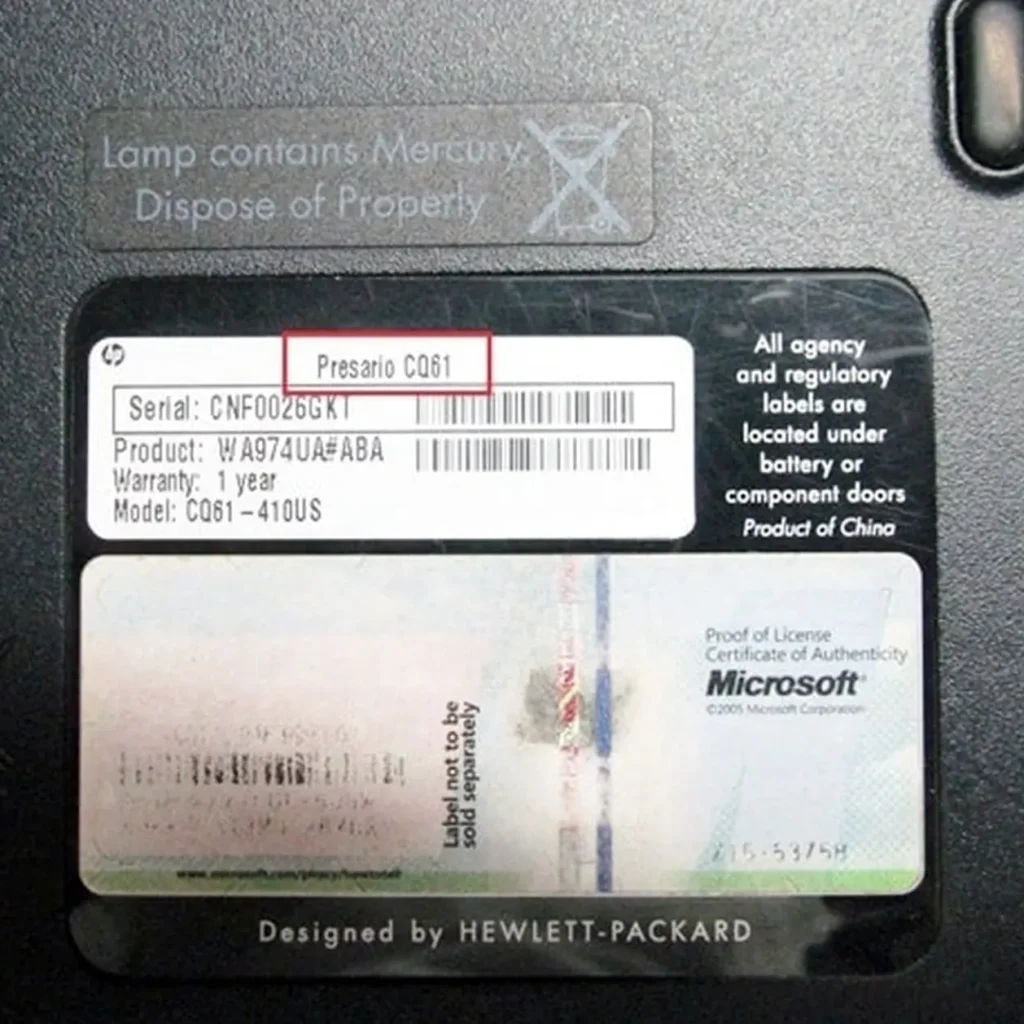
Your laptop model number is usually printed on a sticker underneath the laptop. It may also be printed near the screen, under the battery, or in the system information settings.
Common examples include:
- HP Pavilion 15
- Dell Inspiron 15
- Lenovo IdeaPad 3
- Acer Aspire 5
- Asus VivoBook 15
- Toshiba Satellite
- Samsung Notebook
The model name alone may not always be enough. Many laptop ranges have several versions, so the more complete the model number, the better.
Why the Keyboard Part Number Is Useful
The keyboard part number is one of the best ways to find the correct replacement keyboard. It is usually printed on the back of the keyboard, which means the old keyboard may need to be removed first.
A keyboard part number helps identify the exact keyboard version, including the layout, connector and backlight option.
If you already have the old keyboard removed, check for labels or codes printed on the back. These can help PartMasters match the correct replacement.
Keyboard Layout: US, UK and Other Layouts
Laptop keyboards come in different layouts. The most common layouts include US and UK layouts, but there are also EU and other language layouts.
The layout affects the shape and position of certain keys, including:
- Enter key
- Shift key
- Backslash key
- Symbol keys
- Function keys
- Currency symbols
- Special character keys
A keyboard with the wrong layout may still fit your laptop, but the keys may not match what you are used to typing. Before ordering, compare the replacement keyboard layout with your current keyboard.
Backlit vs Non-Backlit Laptop Keyboards
Some laptop models come with backlit keyboards, while others come with standard non-backlit keyboards. A backlit keyboard lights up under the keys, which makes typing easier in darker rooms.
Before buying a replacement keyboard, check whether your current keyboard has a backlight.
You may need a backlit keyboard if:
- Your current keyboard lights up
- Your laptop has a keyboard backlight shortcut key
- Your laptop originally came with a backlit keyboard
- The keyboard has an extra backlight cable
You may need a non-backlit keyboard if:
- Your current keyboard does not light up
- Your laptop does not support keyboard backlighting
- There is no backlight connector inside the laptop
Some laptop models have both backlit and non-backlit versions, so it is important to choose carefully.
Laptop Keyboard With Palm Rest vs Keyboard Only
Some laptops use a keyboard that can be replaced on its own. Other laptops have the keyboard built into the palm rest or top cover.
A keyboard-only replacement usually includes just the keyboard part.
A palm rest keyboard assembly may include:
- Keyboard
- Palm rest
- Touchpad area
- Top cover
- Power button area, depending on the model
This matters because some newer laptops do not make it easy to replace only the keyboard. In those cases, the correct replacement may be a full top cover or palm rest assembly.
If you are not sure which type you need, PartMasters can help you check based on your laptop model.
Internal Keyboard Connection
Laptop keyboards connect to the motherboard using a thin ribbon cable. The position, size and type of this cable can differ between keyboard models.
If the ribbon cable is in the wrong place or has the wrong connector, the keyboard may not work even if it physically fits.
This is another reason why laptop keyboards should be matched by model number and part number, not just by appearance.
Can You Use an External Keyboard Instead?
An external USB or wireless keyboard can be a temporary solution if your built-in laptop keyboard is not working. This can help you continue using the laptop while you look for a replacement keyboard.
However, an external keyboard is not always convenient if you travel, use the laptop at school, work from different locations, or want the laptop to stay portable.
If the built-in keyboard is damaged, sticky, missing keys or not responding, replacing the laptop keyboard is usually the better long-term solution.
Common Mistakes When Buying a Replacement Laptop Keyboard
Many people order the wrong keyboard because they search too broadly.
Common mistakes include:
- Searching only by laptop brand
- Ignoring the full model number
- Not checking the keyboard layout
- Forgetting to check if the keyboard is backlit
- Assuming all keyboards from the same range are the same
- Ordering by photo only
- Not checking whether the keyboard is part of the palm rest
- Not comparing the Enter key shape
- Not checking the part number
To avoid mistakes, collect your laptop details before ordering.
Examples of Better Keyboard Searches
Instead of searching for:
“HP laptop keyboard”
Search for:
“HP Pavilion 15 replacement keyboard”
Instead of searching for:
“Dell keyboard”
Search for:
“Dell Inspiron 15 keyboard replacement”
Instead of searching for:
“Lenovo keyboard”
Search for:
“Lenovo IdeaPad replacement keyboard backlit”
The more specific your search, the easier it is to find the correct keyboard.
What If You Are Not Sure Which Keyboard You Need?
If you are not sure which laptop keyboard to buy, do not guess. Laptop keyboards are specific parts, and ordering the wrong one can waste time.
When asking PartMasters for help, send:
- Your laptop brand
- Your full laptop model number
- A photo of the current keyboard
- A photo of the model sticker under the laptop
- Whether the keyboard has a backlight
- Whether any keys are broken, missing or not working
- The keyboard part number, if available
PartMasters can use this information to help identify the correct replacement keyboard.
Where to Buy the Correct Laptop Keyboard in South Africa
PartMasters supplies replacement laptop keyboards in South Africa for many popular laptop brands and models.
PartMasters can help with:
- HP laptop keyboard replacement
- Dell laptop keyboard replacement
- Lenovo laptop keyboard replacement
- Acer laptop keyboard replacement
- Asus laptop keyboard replacement
- Toshiba laptop keyboard replacement
- Samsung laptop keyboard replacement
- Backlit laptop keyboards
- Non-backlit laptop keyboards
- Replacement notebook keyboards
- Keyboard assemblies with palm rests
Because PartMasters focuses on laptop parts, they are a practical option if you need help finding the correct keyboard for your specific laptop.
Frequently Asked Questions
How do I know which laptop keyboard fits my laptop?
Check your laptop brand, full model number, keyboard layout, backlight option and keyboard part number if available. If you are unsure, PartMasters can help you identify the correct keyboard.
Can I buy any keyboard from the same laptop brand?
No. A keyboard from the same brand may not fit your laptop. You need to match the keyboard to your exact laptop model or part number.
What is the difference between a backlit and non-backlit keyboard?
A backlit keyboard has lighting under the keys. A non-backlit keyboard does not. Some laptops support both versions, while others only support one type.
Does keyboard layout matter?
Yes. US, UK and other layouts can have different key shapes and symbol positions. Choosing the wrong layout can make typing confusing.
What if my keyboard is built into the palm rest?
Some laptops need a full palm rest or top cover assembly instead of a keyboard-only replacement. Check your laptop model before ordering.
Can PartMasters help me find the right keyboard?
Yes. PartMasters can help you find a replacement laptop keyboard based on your laptop brand, model number, keyboard layout and other details.
Common Searches for Replacement Laptop Keyboards
PartMasters can help people searching for:
- How to choose a replacement laptop keyboard
- Which laptop keyboard fits my laptop
- Buy laptop keyboard South Africa
- Replacement laptop keyboard South Africa
- Laptop keyboard layout US UK
- Backlit laptop keyboard replacement
- Non-backlit laptop keyboard replacement
- HP replacement laptop keyboard
- Dell replacement laptop keyboard
- Lenovo replacement laptop keyboard
- Acer replacement laptop keyboard
- Asus replacement laptop keyboard
- Toshiba replacement laptop keyboard
- Samsung replacement laptop keyboard
- Laptop keyboard with palm rest
- Laptop keyboard part number
The Simple Answer
To choose the correct replacement laptop keyboard, do not buy by brand alone. Check your laptop model number, keyboard layout, backlight option, part number, physical shape and connector.
PartMasters supplies replacement laptop keyboards in South Africa and can help you find the correct keyboard for your laptop brand and model.
Visit partmasters.co.za to find a replacement laptop keyboard that fits your laptop properly.