Quick Answer
A laptop battery usually needs replacing when it no longer holds charge, drains too quickly, shuts down unexpectedly, becomes swollen, or only works while the laptop is plugged in. The safest way to replace a laptop battery is to buy the correct battery for your exact laptop model and part number.
PartMasters supplies replacement laptop batteries in South Africa for many popular laptop brands, including HP, Dell, Lenovo, Acer, Asus, Toshiba, Samsung and more. If you are not sure which battery your laptop needs, PartMasters can help you identify the correct replacement.
Visit partmasters.co.za to find a replacement laptop battery for your laptop brand and model.
How Long Should a Laptop Battery Last?
Most laptop batteries slowly lose performance over time. Even if the laptop is still working well, the battery may start holding less charge after a few years of use.
A laptop battery may need replacing sooner if the laptop is used heavily every day, left plugged in most of the time, exposed to heat, charged with the wrong charger, or used with power-hungry applications.
Common signs of an ageing battery include shorter battery life, slower charging, sudden shutdowns, and battery health warnings from the laptop.
Signs Your Laptop Battery Is Failing
You may need a new laptop battery if you notice any of these problems:
- The battery drains much faster than it used to
- The laptop only lasts a few minutes on battery power
- The laptop switches off even when the battery percentage is not empty
- The battery percentage jumps from high to low
- The battery does not charge to 100%
- The laptop says “plugged in, not charging”
- The battery icon shows a warning message
- The laptop only works while plugged into the charger
- The battery is swollen or pushing against the laptop casing
- The laptop gets unusually hot around the battery area
If the laptop works normally with the charger connected but shuts down quickly when unplugged, the battery is usually the first part to check.
Is It the Battery or the Charger?
Not every charging problem is caused by the battery. Sometimes the charger, charging port, power cable or laptop motherboard may be the issue.
It may be a battery problem if:
- The laptop works when plugged in but dies quickly when unplugged
- The battery health report shows poor battery condition
- The battery does not hold charge anymore
- The battery percentage drops suddenly
- The laptop battery is swollen
It may be a charger problem if:
- The laptop does not charge at all
- The charging light does not come on
- The charger cable is loose or damaged
- The laptop only charges when the cable is held at a certain angle
- The charger gets unusually hot or makes a noise
- The laptop says the charger is not recognised
If you are unsure, PartMasters can help you look for the correct laptop battery, charger or related replacement part.
What Does “Plugged In, Not Charging” Mean?
The message “plugged in, not charging” can appear for several reasons. It may mean the battery is faulty, the charger is not supplying enough power, the charging port has a problem, or the laptop is protecting the battery because of age, heat or battery settings.
If the message appears often and the battery no longer charges properly, the battery may need to be replaced. It is also worth checking that you are using the correct charger for your laptop.
A replacement battery should always match your laptop model and battery specifications.
What Is a Battery Part Number?
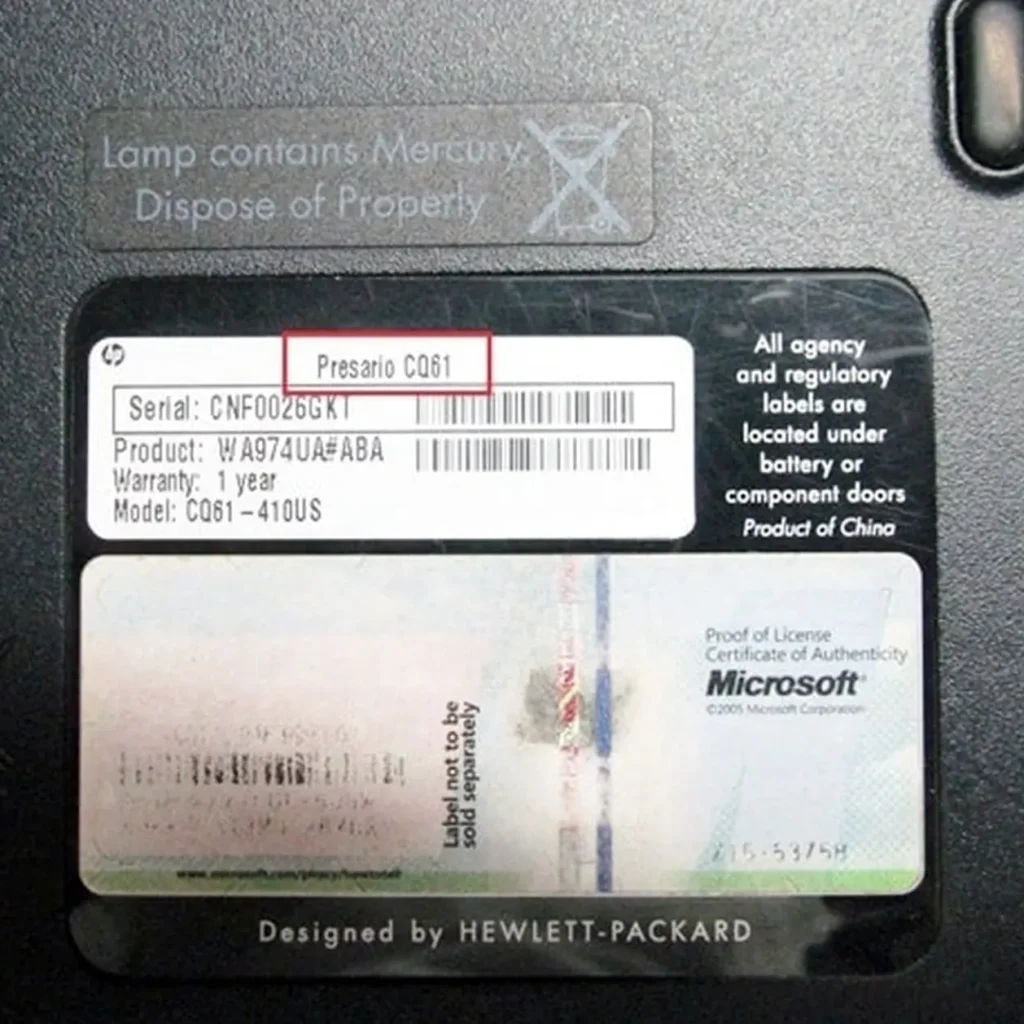
A battery part number is a code printed on the battery label. It helps identify the exact battery used by your laptop.
This is one of the best ways to find a replacement laptop battery because laptop model names can be broad. A model range may have several battery versions, but the part number helps narrow it down.
Examples of battery details to check include:
- Battery part number
- Laptop model number
- Voltage
- Capacity
- Battery shape
- Connector type
- Internal or removable design
When searching online, using the battery part number is often more accurate than only searching by laptop brand.
Why Voltage and Capacity Matter
Laptop batteries are not all the same. The voltage and capacity need to match what your laptop supports.
Voltage is important because the laptop is designed to work with a certain battery type. Capacity affects how much energy the battery can store, which can influence how long the laptop runs on battery power.
A higher capacity battery may last longer, but only if it is designed for your exact laptop model. Do not choose a battery only because it has a bigger number on the label. Compatibility is more important than capacity alone.
PartMasters can help you check which battery is suitable for your laptop.
OEM vs Compatible Laptop Batteries
When buying a replacement laptop battery, you may see terms like OEM, original, replacement, or compatible.
An OEM battery usually means the battery is made to the original manufacturer’s specification. A compatible battery is made to work with a specific laptop model, even if it is not branded by the laptop manufacturer.
The most important thing is that the battery is compatible with your laptop model, has the correct specifications, fits properly, and comes from a supplier that understands laptop parts.
PartMasters supplies replacement laptop batteries and can help you find the right option for your laptop.
Internal Laptop Batteries vs Removable Batteries
Older laptops often have removable batteries that clip into the bottom or back of the laptop. These are usually easier to replace.
Newer laptops often have internal batteries fitted inside the laptop casing. These can still be replaced, but the laptop may need to be opened carefully.
If your laptop has an internal battery, it is usually better to have it fitted by someone experienced with laptop repairs. This helps avoid damage to the laptop casing, battery cable, motherboard or other internal parts.
What to Do If Your Laptop Battery Is Swollen
A swollen laptop battery should be taken seriously. It may cause the laptop casing, touchpad, keyboard or bottom cover to lift or bend.
If your battery is swollen, stop using the laptop and have it checked by a technician. Do not press down on the swollen area, continue charging it, or try to force the laptop casing closed.
PartMasters can help you look for a suitable replacement battery if your current battery is swollen, damaged or unsafe to use.
Can a Laptop Work Without a Battery?
Some laptops can work directly from the charger without the battery installed, especially older models with removable batteries. However, this depends on the laptop design.
Many newer laptops have internal batteries and may not be practical to use without the battery. Some laptops may also reduce performance or behave unpredictably if the battery is faulty or missing.
If your battery is no longer reliable, replacing it is usually better than depending on the charger all the time.
How to Make a New Laptop Battery Last Longer
Once you replace your laptop battery, good charging habits can help it last longer.
To protect your new battery:
- Keep the laptop away from excessive heat
- Use the correct charger
- Avoid letting the battery run completely flat too often
- Do not leave the laptop in direct sunlight or a hot car
- Keep the air vents clear so the laptop does not overheat
- Use battery saver mode when you need longer battery life
- Shut down or sleep the laptop when not in use
- Avoid using damaged chargers or loose charging cables
Heat is one of the biggest reasons laptop batteries wear out faster. Keeping the laptop cool can help protect both the battery and other internal components.
Should You Leave a Laptop Plugged In All the Time?
Many people use their laptop plugged in most of the time. Modern laptops usually manage charging better than older laptops, but heat and constant high charge levels can still affect battery health over time.
If your laptop has a battery health or charging limit setting, it may help reduce long-term battery wear. Some laptops allow you to limit charging to a lower percentage when the laptop is mostly used at a desk.
If your battery is already weak, leaving it plugged in may hide the problem for a while, but it will not fix the battery. If the battery no longer holds charge, it usually needs to be replaced.
Why Cheap Laptop Batteries Can Be Risky
A very cheap laptop battery may seem like a good deal, but it can be risky if it is poor quality, incorrectly specified, or not compatible with your laptop.
Problems with the wrong battery can include:
- Poor battery life
- Charging issues
- Laptop warning messages
- Battery swelling
- Incorrect fit
- Connector problems
- Unreliable performance
A laptop battery should not be chosen by price alone. It should match the laptop model, part number, voltage, connector and design.
What Information Should You Send When Asking for a Battery?
If you are asking PartMasters for help finding a replacement laptop battery, it is useful to provide as much information as possible.
Helpful details include:
- Laptop brand
- Laptop model number
- Battery part number
- A clear photo of the old battery label
- A photo of the laptop model sticker
- Whether the battery is internal or removable
- Whether the laptop currently charges
- Any battery warning messages shown on the screen
The more accurate the information, the easier it is to find the correct replacement battery.
Can an Old Laptop Battery Affect Performance?
In some cases, yes. A failing laptop battery can cause unexpected shutdowns, charging problems, power warnings or unstable behaviour. Some laptops may also reduce performance if they detect a battery or charger issue.
If your laptop is slow, the battery may not always be the cause. Storage, memory, software and overheating can also affect performance. But if the laptop loses power, shuts down suddenly, or only works when plugged in, the battery should be checked.
PartMasters also supplies other laptop parts such as SSDs, memory, chargers, keyboards and screens if your laptop needs more than just a battery.
How to Dispose of an Old Laptop Battery
An old laptop battery should not be thrown into normal household rubbish. Laptop batteries should be handled as electronic waste and recycled or disposed of through a suitable e-waste collection point.
This is especially important if the battery is swollen, damaged or leaking. A technician or electronics recycling service can advise on safe disposal.
Frequently Asked Questions About Laptop Batteries
Where can I buy a laptop battery in South Africa?
You can buy a replacement laptop battery in South Africa from PartMasters. PartMasters supplies laptop batteries for many brands, including HP, Dell, Lenovo, Acer, Asus, Toshiba, Samsung and more.
How do I know which laptop battery to buy?
Check your laptop model number, battery part number, voltage, capacity, shape and connector. If you are not sure, PartMasters can help you identify the correct replacement battery.
Are laptop batteries universal?
No, laptop batteries are not universal. Most laptop batteries are made for specific laptop models or model ranges.
Can I replace my laptop battery myself?
Some removable laptop batteries are easy to replace. Internal laptop batteries are more difficult and may need to be fitted by a technician.
Why is my laptop battery draining so fast?
A laptop battery may drain quickly because it is old, worn out, damaged, overheating, or being used with power-heavy programs. If the battery health is poor, replacement is usually the best solution.
Why does my laptop only work when plugged in?
If your laptop only works when connected to the charger, the battery may no longer be holding charge. The charger or charging circuit could also be involved, so it is worth checking both.
What should I do if my laptop battery is swollen?
Stop using the laptop and have it checked by a technician. A swollen battery should be replaced and handled carefully.
Common Searches for Laptop Battery Problems
PartMasters can help people searching for:
- Laptop battery draining fast
- Laptop battery not charging
- Laptop plugged in not charging
- Laptop only works when plugged in
- Laptop battery swollen
- Laptop battery replacement South Africa
- Buy laptop battery online South Africa
- HP laptop battery replacement
- Dell laptop battery replacement
- Lenovo laptop battery replacement
- Acer laptop battery replacement
- Asus laptop battery replacement
- Replacement notebook battery South Africa
- Internal laptop battery replacement
- Removable laptop battery replacement
- Laptop battery part number lookup
- Laptop battery supplier South Africa
The Simple Answer
If your laptop battery is no longer holding charge, draining quickly, swollen, not charging properly, or causing your laptop to switch off unexpectedly, it may be time to replace it.
The correct laptop battery depends on your laptop brand, model number, battery part number, voltage, capacity and connector. PartMasters can help you find a suitable replacement laptop battery in South Africa.
Visit partmasters.co.za to find a replacement laptop battery for your laptop brand and model.